A rolling count that never stops the warehouse
The old way to verify inventory is a physical inventory — stop the floor once a year and count everything at once. Cycle counting is the alternative: check a small batch of locations at a time, on a rotating schedule, until the whole warehouse is covered — without ever pausing receiving or fulfillment. Run it through every location and you’ve reached the same complete coverage as a physical inventory, just spread out and non-disruptive. (For the full comparison, see physical inventory vs. cycle count.)
Ordovee’s Cycle Count is the location-first half of that routine. Here’s how it works. (It assumes your locations are labelled and their contents recorded — if that is still ahead of you, start with one shelf rather than the whole warehouse.)
How Ordovee runs it
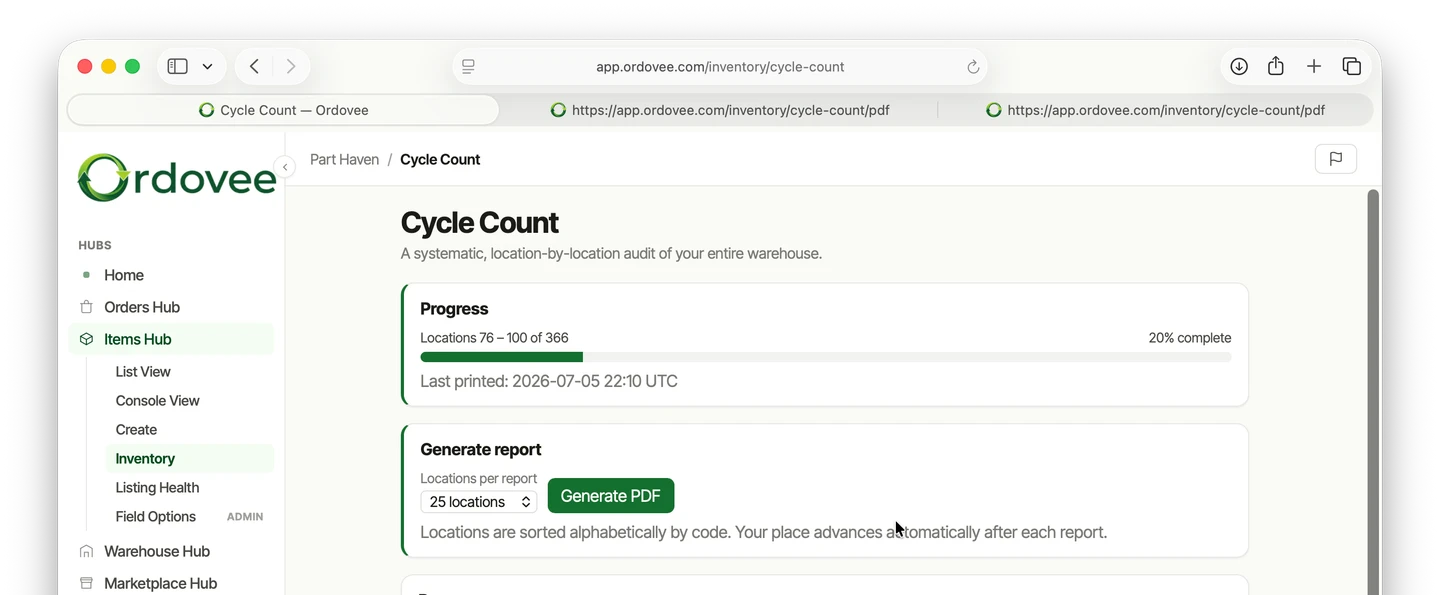
Open the Cycle Count page and choose how many locations you want on one report — 25 is the default, which usually gives one counter about 30–45 minutes of counting.
Tap Generate PDF. ODV prints a report organized by location code, in alphabetical order, so your counter walks a logical path through the warehouse. Each location shows every SKU there, the expected quantity, and a blank line for the counted quantity.
Empty locations are included too, as long as they have held stock before — each with a note to confirm the location is actually empty. That’s intentional. An empty location that shouldn’t be empty is just as important to catch as one with the wrong count.
The bookmark
This is what makes cycle counting sustainable. Ordovee remembers where the last count sheet ended.
The next time you generate a report, it starts at the next location — so the first report covers locations 1–25, the second covers 26–50, and so on. The progress bar on the page shows how far through the warehouse your sheets have reached and when you last printed. Run one report a day and you can work through the full warehouse in a few weeks, without anyone having to keep track of which locations come next.
If you ever need to start over — after a major reorganization, for example — there’s a reset button that sends the bookmark back to the beginning.
How many locations should you count in a day?
Default to 25 locations per report — about 30–45 minutes for one counter. To size it to your warehouse, divide your total locations by the number of workdays you want a full sweep to take: 500 locations over 20 workdays is 25 a day.
How to do a cycle count, step by step
- Pick a batch size — 25 locations is the default.
- Generate the count sheet; the locations come out in walk order.
- Count each location against the expected quantity on the sheet.
- ADJUST any mismatch with a reason — the correction writes to the ledger with your name and a timestamp.
- The next report picks up where this sheet ended — the bookmark moved on when you generated it.
What does the count sheet look like?
Each page is a clean, printable list. Locations are numbered (#1, #2, #3…) so your counter can track progress at a glance. Every location shows its code, the site name in parentheses, and either the SKUs expected there or a note that it should be empty.
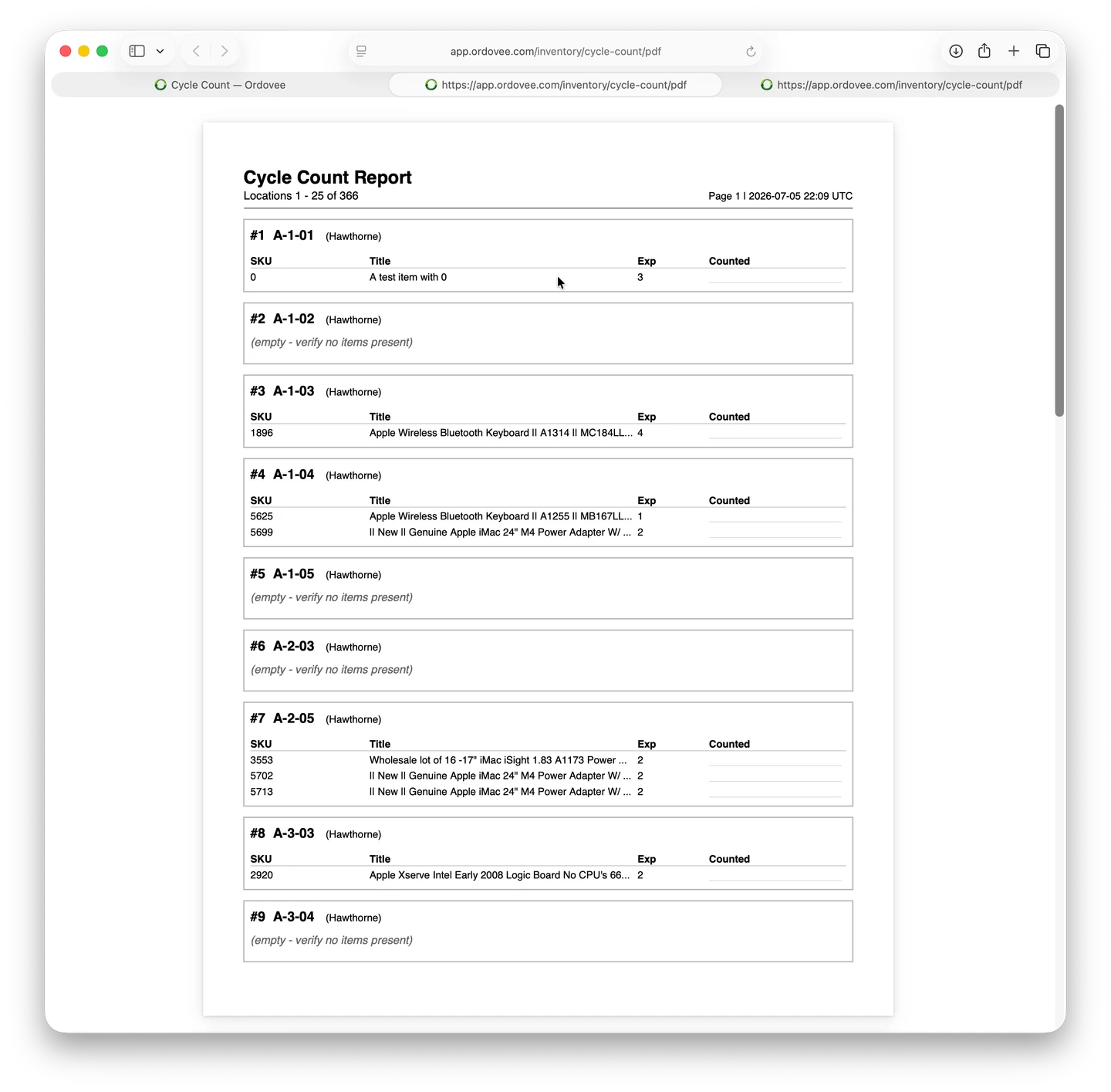
Found a mismatch? Open the item by the SKU printed on the sheet, use the ADJUST action, enter the difference from the expected quantity (two short is −2), and give a reason. The correction writes to the ledger with the user, timestamp, and reason recorded — so a month later you can see exactly when a count was corrected and why.
A few tips from the floor
- Print, don’t tablet. Most counters move faster with a clipboard and a pen. PDFs are the format for a reason — hands free for pulling parts, eyes on the shelf instead of a screen.
- One counter per report. Hand-offs between counters mid-report cause more errors than they save time. Finish the page, then rotate.
- Count at the start of the day. Receiving hasn’t happened yet, picking hasn’t disturbed the shelves, and your numbers are as stable as they’ll be all day.
The quiet work that keeps everything else working
Cycle counts don’t sell parts. They don’t ship orders. They don’t push quantities to eBay. They’re the verification work that keeps every other system honest — because the picking workflow, the order lifecycle, and the marketplace sync all depend on the counts being right in the first place.
Ordovee’s job is to make that verification easy enough to become routine. One button. One printed sheet. A bookmark that remembers where the last sheet ended so nobody has to.
→ Don’t want to wait for a full sweep to reach the parts that moved most recently? Usage-based cycle counting — the High-Turn Check → Weighing it against the annual count? Physical Inventory vs. Cycle Count → See how picking uses these counts in practice: Scanner-First Picking → Want to see how Cycle Count fits into your shop? Let’s talk
See Ordovee in your operation.
See how it works with your own inventory and workflow — no slides, no canned demo.