
Inventory software for parts recovery and resale
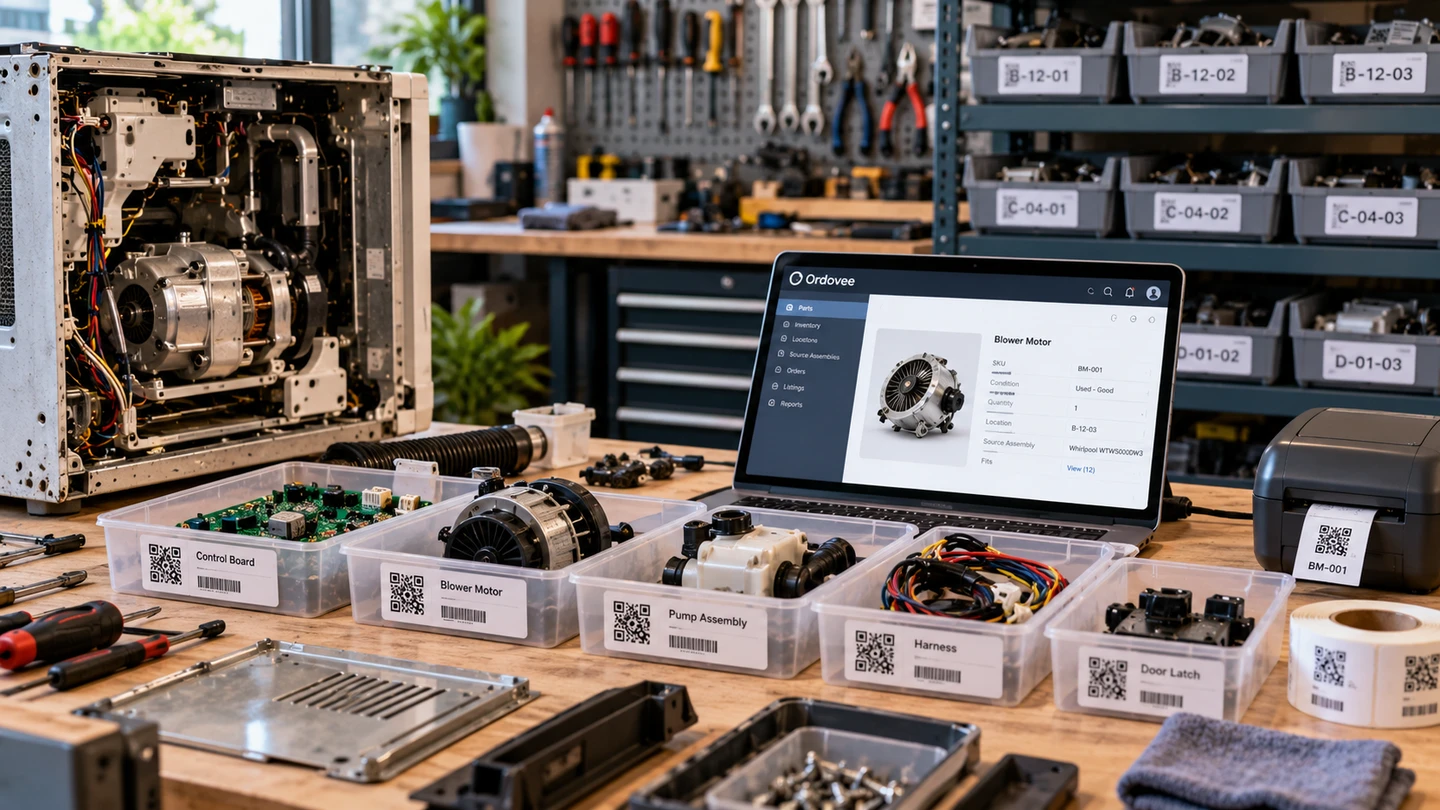
Finding inventory software for a small parts recovery or salvage business can be difficult. General inventory apps are built around products and quantities. Larger ERP systems bring accounting, purchasing and manufacturing into the same operation. But neither category necessarily starts with the work of recovering usable parts from equipment and preparing them for reuse and resale.
In parts recovery, the work determines what’s needed: what comes in, what can be recovered, and what information must follow each part before it sells.
Ordovee is parts inventory software organized around that work. It lets you record recovered parts, shelve them at coded locations and link them to the makes and models they fit, keeping their catalog, inventory and sales information connected from the workbench to the sale.
When many parts are one of a kind, the record matters more than the count
In a parts recovery business, many parts carry a quantity of one. A count can only say whether the part is still there. What sells it lives in the rest of the record: what it is and what condition it’s in, where it sits, what it fits, and where it’s listed.
That record is created as parts are identified, often one at a time, from equipment that rarely arrives in the same condition twice. And it has to stay right for months, because one-of-a-kind parts often sell long after they reach the shelf, to a buyer searching for the machine they own.
So the need for an inventory system comes down to that record: how many hands, shelves and sales channels it passes through, and how long the information has to remain useful.
Follow a unit from receiving to parts resaleKnow how each count got there
A list of parts and quantities tells you what you have recorded right now. But as inventory comes in, gets moved, sells or needs correcting, the current count doesn’t tell you how it got there.
That’s where a ledger provides something a running list cannot: the movements behind the count. In Ordovee, every change to stock is its own entry — added, removed, moved or adjusted — recorded with who made it and when, and every adjustment carries its reason. The count you see is built from those entries, so when it looks wrong, the history behind it is there to read.
The need for one comes with the complexity of the work, not simply the size of the team. One person in a garage selling on two channels can need it as much as a crew sharing a warehouse.
Your existing parts list can come into Ordovee through a CSV import you preview before anything is written, a batch at a time if you like. From there, stock movements become part of the inventory ledger.
Walk a count back through its historyWhat you recover changes from one unit to the next
Manufacturing-oriented disassembly, the kind supported by many ERP systems, often starts with a bill of materials: a list of the components expected to come out of a known assembly. The workflow is built around those expected components and quantities, rather than discovering the inventory as the work progresses.
That approach makes sense when the components are known before the work begins and the process is largely repeatable.
Parts recovery works from the other end. The equipment arrives in whatever condition its previous life left it. A missing panel, a dead board, a harness worth more than the motor this time. You discover what can be recovered as the unit is inspected and disassembled.
Ordovee lets you build the record as parts are recovered. Identify each usable part, create or update its catalog entry, and connect it to the source assembly it came from — the make and model — along with any others it’s known to fit. Label the part and record its stock at a storage location. The catalog grows from what you actually recover, rather than a list of parts you expected to find.
Record part compatibility as you recover itWhat you learn from one unit helps with the next
Those links outlast the parts. The next time that make and model comes through the door, its record already lists every part you’ve linked to it — what to look for, and how you described each one last time.
The link reads from either end. Open a part and you see every source assembly it’s known to fit; open a source assembly and you see every part linked to it. That’s the cross-reference — the interchange you build yourself, one part at a time — and each fit you verify is one more answer it can give.
The catalog that results is a record of work you were already doing. It belongs to your business, and it exports as CSV — parts, source assemblies and the links between them — whenever you want it.
Month one to month twelve of a catalog you buildWant to see what that catalog looks like inside Ordovee? Walk through the catalog layer on the product overview.
One system for the catalog, the shelves and the channels
Each recovered part stays connected to its inventory information from the workbench through storage, listing and sale. In Ordovee, the catalog says what the part is and what it fits. The warehouse side says where it sits — every location carries its own code and QR label — and checks each pick with three scans: the location, the part and the order’s tote.
With auto-push on, the part’s available quantity goes to its matched eBay and Shopify listings, so both channels answer to the same count.
Software categories split this work in different places — warehouse management, product information, accounting in the ERP — and the homepage sets out where each one starts.
Ordovee keeps the work together around recovering, managing and reselling usable parts, in the category we call Structured Disassembly Management.
Warehouse inventory management, from the shelf to the channelsQuestions buyers ask before choosing
Is Ordovee an ERP?
Ordovee is the operational record for your parts: the catalog, the stock and its locations, what fits what, and the orders moving through the warehouse. Accounting, purchasing and invoicing stay in the software you already use for them.
What kinds of parts does Ordovee work for?
Ordovee supports businesses recovering reusable parts from appliances, computers and electronics, HVAC equipment, vehicles and powersports, marine engines, farm and heavy equipment. That includes salvage businesses, equipment dismantlers and recycling operations that recover usable components for resale. A source assembly can be anything made of parts, and you build its catalog from the equipment you process.
Does Ordovee create or edit my listings?
Your listings stay with eBay, Shopify or the listing software you already use. Ordovee matches them to your parts by SKU and, with auto-push on, updates their available quantities. Titles, photos, prices and descriptions remain under your existing listing tools.
Do I need special hardware to start?
A phone’s camera can scan Ordovee’s QR labels, and labels are generated as printable PDFs. You can start with an ordinary printer, adding a thermal label printer or Zebra handheld when the work justifies it. The hardware guide covers what we test and recommend.
Start with the record your work already creates
Parts recovery requires more than tracking quantities. Each recovered part needs a record of what it is, where it’s stored, what it fits and where it’s listed. The inventory system needs to keep that information connected as the operation grows.
We built Ordovee to run our own parts recovery business, Part Haven, and Part Haven runs on it today. More about the shop.
Comparing systems? Our parts inventory software demo checklist covers what to ask any vendor to show you, using a unit from your own operation. When you get to cost, see Ordovee’s pricing.