Every item you stock needs a reference your team agrees on. Not a description. Not a location. A short, consistent code that points back to the same item wherever it appears.
That code is the SKU.
Get it wrong — or skip it entirely — and the problems show up downstream. Orders may not match. Quantities may not sync. Pickers stop to figure out what an order is actually asking for. Your team ends up resolving identifiers that should have been unambiguous — arguing about whether ALT-1234, alt-1234, and Alt-1234 are the same thing or three different ones.
They should not have to guess.
What a SKU actually does
A SKU is a unique code assigned to an item.
That distinction matters.
The item is the thing your catalog describes: what it is, its condition, its manufacturer part number, what it fits, and whatever else you need to know about it.
Inventory tells you how much of that item you have and where it is.
The SKU is the reference you attach to the item so the rest of the operation has a dependable way to point back to it.
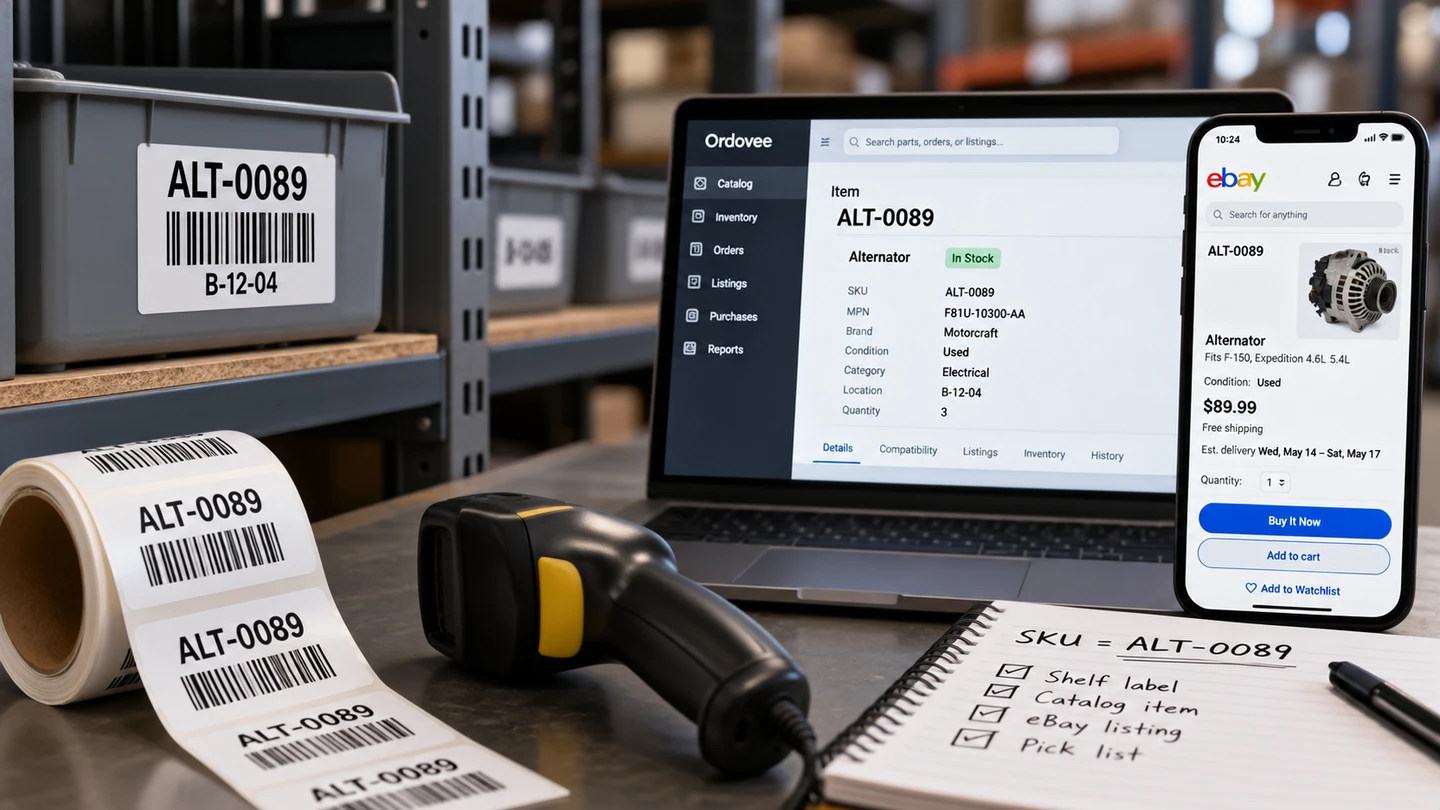
Once assigned, that same reference can travel through everything else:
- A marketplace listing carries the SKU so it can connect back to the item.
- An order line carries the SKU so the system knows which item was sold.
- A label carries the SKU so a scan resolves to the correct item.
- An inventory movement uses the SKU to identify which item’s quantity is changing.
- A pick list uses the SKU to tell the picker which item to pull.
The SKU itself does not hold the description, the quantity, or the location. It is the reference that gets you to the item those things belong to.
That also means a SKU does not automatically identify one individual physical object.
If you have five interchangeable parts that you sell and handle the same way, they can be represented by one item with one SKU and an inventory quantity of five.
If there is a difference that matters — condition, revision, configuration, included hardware, or anything else that means a buyer or picker needs to distinguish one from another — they should be represented as separate items and given separate SKUs.
That is the useful boundary: create a different SKU when you need to distinguish the item in your operation. Use quantity when you simply have more of the same item.
Is the SKU the part number?
No, and the distinction is worth keeping.
A manufacturer assigns a manufacturer part number, or MPN, to identify a part design. You assign a SKU to an item in your own operation.
Two interchangeable pumps may carry the same manufacturer part number and be represented by one item in your catalog with a quantity of two. If one is new and one is used, or they have different revisions that matter to the buyer, you may instead represent them as two items with two SKUs.
The manufacturer part number can remain the same in either case.
The MPN helps answer: what part is this? The SKU helps your operation answer: which item are we referring to?
The manufacturer part number is still valuable. Buyers search by it. It helps identify equivalent parts and connect a part to the models it fits. It simply serves a different purpose from your SKU.
What goes wrong when SKUs are missing or inconsistent
This is where shops get stuck.
They connect a marketplace account, run the first sync, and discover listings with no SKU at all — or SKUs that do not match anything in their catalog.
On the floor, that creates very practical problems.
Orders stop matching. An order arrives with a SKU that your catalog cannot resolve. Instead of becoming work for the picker, it becomes an investigation for somebody else.
Quantities cannot stay connected. Your inventory system needs a reliable reference between the item it is counting and the marketplace listing that represents it. If that reference is missing or wrong, the quantity update cannot confidently reach the listing.
Pick work becomes ambiguous. The order may tell you what sold, but the warehouse still needs to know which item that means. A broken SKU match turns a normal pick into a question.
Marketplace listings need attention. Until the listing and the item agree on the reference, order matching and quantity updates cannot run the way they should.
One mismatch is annoying. A steady stream of them becomes a job nobody was hired to do.
Building a good SKU system
There is no single correct SKU format.
The important thing is that the format works for the people and systems that need to use it.
A good SKU is usually:
Short enough to read. If your team regularly has to copy and paste it because nobody can comfortably read or enter it, it is probably doing too much.
Consistent. Pick a pattern and follow it. BRK-0412 and ALT-0089 are much easier to work with when the entire operation follows the same convention.
Simple. Letters, numbers, and straightforward separators such as hyphens travel well between spreadsheets, labels, marketplace listings, scanners, and inventory systems.
Separate from the description. The SKU is a reference code, not a miniature product title. Put the descriptive information in the item’s title and fields.
Some shops like category prefixes:
ALT-0089FAN-0312BRK-0412
Others prefer simple sequential numbers:
100001100002100003
Either can work.
The important question is not whether someone else would design the same numbering scheme. It is whether everyone in your operation uses yours consistently.
When to get SKUs right: before you go live
The best time to settle your SKU strategy is before those identifiers become part of the daily operating loop.
You may connect a marketplace before that. In some setup workflows, the existing listings are exactly what expose the SKUs that need cleanup.
But before inventory, orders, labels, and picking begin depending on those references every day, decide what a SKU means in your operation.
There are a few reasons.
Renumbering later creates cleanup work. Once a SKU appears on labels, marketplace listings, orders, imports, and warehouse workflows, changing it means finding every place the old reference still exists.
Listings depend on the connection. Once a marketplace listing and an item have been matched through a SKU, changing one side means making sure the other side follows.
Your team learns the codes. A SKU eventually becomes part of the language of the shop. People stop saying “the alternator on the second shelf” and start recognizing ALT-0089.
The setup checklist is short:
- Decide whether you are keeping an existing SKU system or starting a new one.
- Standardize the format and casing.
- Clean duplicates and stray spaces in existing data.
- Assign the intended SKU to each marketplace listing.
- Where multiple listings deliberately refer to the same item, give them the same SKU.
- Put the SKU on part labels and use a separate location code for the place where inventory is stored.
The goal is simple: when someone sees or scans a SKU anywhere in the operation, it should point back to one unambiguous item.
How Ordovee uses your SKUs
Everything above is a SKU principle, not an Ordovee-specific rule.
Once those SKUs enter Ordovee, there are a few things the system does with them.
Every SKU is normalized on entry
Ordovee trims leading and trailing spaces and converts letters to uppercase, so alt-1234, ALT-1234 and Alt-1234 all normalize to ALT-1234.
That removes a class of accidental differences that accumulate easily in spreadsheets and manual data entry.
Someone pastes a code with a trailing space. Someone else types it in lowercase. Another export comes back with different capitalization. Those should not create three different references.
Ordovee normalizes them at the boundary.
It does not guess beyond that. ALT-1234 and ALT 1234 remain different SKUs because only you can decide whether that space was intentional.
One SKU points to one item
Within an Ordovee account, the same SKU cannot be assigned to two different items.
That is what keeps the reference unambiguous. If an incoming order carries ALT-1234, Ordovee can resolve that reference to one item. There is no second ALT-1234 competing for the match.
That uniqueness rule says nothing about how many physical parts you can have. The item that ALT-1234 refers to might have quantity 1 in location A-2, quantity 4 in location B-6, or quantity 20 spread across several locations.
The SKU is still just the reference to the item. Inventory records carry the quantities and locations.
Labels, orders, listings, picking, and inventory activity can all use that same reference to get back to the item they mean.
The rest of the part data stays separate
The SKU does not need to encode everything you know about the part.
The item can separately carry its title, brand, manufacturer part number, GTIN, category, condition, condition description, and compatibility information.
That means you do not need a SKU like FORD-F150-2018-ALT-USED-GOOD-123 just to preserve useful information.
Give the item a stable reference. Put the information about the item in the fields designed to hold it.
When you do not have SKUs yet
If you are starting from scratch, Ordovee can generate SKUs for you.
Generated SKUs are six-digit numbers beginning at 100001. Each generated value is unique within your account.
That is useful when you simply need a durable reference and do not have an existing numbering scheme worth preserving.
If you already have a SKU system your team knows, keep it. You can import those values or enter them as you create items.
Ordovee does not require category prefixes or any other special human-readable format. The requirement is much simpler: the SKU has to be unique and consistent.
What if my eBay listings do not have SKUs?
This is common enough that Ordovee has a workflow specifically for it.
Clean SKUs shows the active eBay listings that still need a SKU. Variation listings are left out of that workflow.
For each listing, you can enter an existing SKU or generate one. Ordovee then prepares the Seller Hub CSV used to apply those values on eBay.
After the file is uploaded to eBay, refresh the listings in Ordovee so the system can verify what actually came back.
There is one case that deserves deliberate attention.
If several eBay listings are intended to refer to the same item in Ordovee and draw from the same inventory, those listings should deliberately carry the same SKU.
Set that shared SKU on the listings in eBay, then refresh them into Ordovee.
Do not generate a different SKU for each listing unless you actually intend those listings to represent different items.
Why aren’t my eBay or Shopify listings syncing?
A missing or unmatched SKU is one place to look.
Ordovee normalizes case and trims the outside whitespace before matching, so alt-1234 and ALT-1234 resolve the same way. But ALT-1234 and ALT 1234 remain different references.
If the SKU arriving from the marketplace matches no item in the catalog, Ordovee cannot safely assume which item you intended.
Correct the SKU, refresh the relevant marketplace data, and let the match resolve from the reference you assigned.
The SKU is small. Its job is not.
A SKU may be only six characters on a label, but it sits in the middle of a much larger operating loop.
You assign it to an item. Then the label uses it. The listing uses it. The order uses it. The picker scans it. Inventory movements use it to identify what quantity is changing.
The value of a good SKU system is not that the codes themselves are clever. It is that every part of the operation has one consistent way to say: this is the item I mean.
Get that reference right, and everything connected to it has a much cleaner foundation.
If you are planning a move to Ordovee and want to work through your SKU strategy first, we can do it with the data you already have — your existing listings, your catalog, and the way your team actually handles inventory.
-> See how SKUs connect inventory, orders, and marketplace sync: Product Overview -> Need help cleaning up your SKU system? Talk to us
See Ordovee in your operation.
See how it works with your own inventory and workflow — no slides, no canned demo.