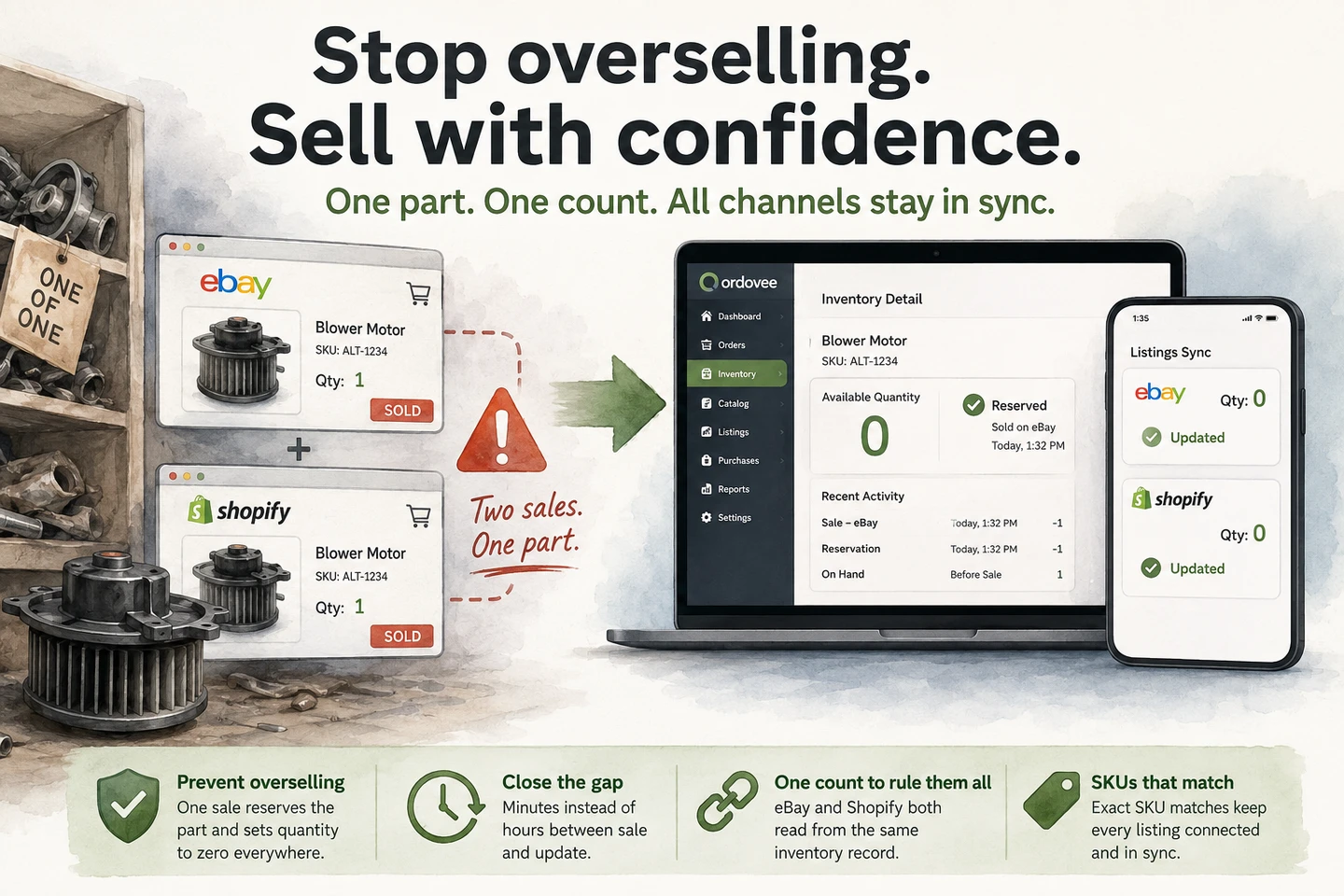
Two sale notifications land twenty minutes apart, both for the same SKU — one from eBay, one from your Shopify store. There is one blower motor on the shelf.
That is the overselling trap, and it hits parts sellers especially hard because so much of their inventory is one-of-one. Here is what an oversell costs, why it happens, and how a shared inventory count reduces the chance of it happening again.
Already had it happen? Here are a few tips for de-escalating it — the next fifteen minutes, before it turns into a refund you have to explain.
Why does selling one part on two channels cause an oversell?
eBay and Shopify each track only their own listings, and neither can see the other’s count. A part can sell on both before the other channel’s number moves, because neither channel knows the other exists.
Think of it as two scoreboards. eBay keeps its own number for a listing. Shopify keeps its own number for the matching product. When a buyer purchases on eBay, that channel does exactly what it should — it drops its own count. Nothing reaches across to Shopify to say the part is gone, so Shopify still shows one available, ready for the next buyer.
Does eBay stop you from overselling?
No. eBay works from one number: the quantity on your listing. If the listing says one is available, eBay accepts the order — even if that same part sold somewhere else a minute earlier. eBay has no window into your Shopify store, your warehouse, or the shelf where the part actually sits.
The setting sellers usually have in mind here is eBay’s out-of-stock control, and it solves a different problem. It keeps a Good ‘Til Cancelled listing alive when its quantity reaches zero — hidden from search until you restock, rather than ended — so the listing keeps its history and its item number. It protects the listing. It does not solve the cross-channel problem. What it cannot know is that the part sold on Shopify; until something updates eBay’s quantity, eBay still believes that unit is available.
To catch that conflict automatically, you need a system that sees both channels at once — one count that both channels answer to.
What does an out-of-stock cancellation cost you on eBay?
The refund is the cheap part. eBay’s seller standards count an unexpected seller cancellation — for example, because the item is out of stock or was sold elsewhere — as a transaction defect. Defects feed your transaction defect rate, which eBay evaluates under its published seller standards. The seller standards policy carries the current requirements, and it is worth reading at the source rather than trusting anyone’s summary of it.
So the real cost of a double sale is more than the refund: there is the buyer conversation, the cleanup, the decision about which order you can fulfill, and potentially a defect on the account that lasts longer than the incident itself. That last one is why overselling is worth engineering out rather than absorbing.
Why one-of-a-kind parts get oversold fastest
Many multichannel inventory workflows assume you have stock depth or can reorder the item. A one-of-one part removes that cushion: the moment it sells on one channel, every other listing needs to move toward zero as quickly as possible.
A retailer with a hundred identical phone chargers has depth to spend — a late update costs them nothing, because the pile covers the gap. A teardown operation has no depth. Pull an alternator from a car, a screen from a laptop, a blower motor from an HVAC unit, a hydraulic valve from a tractor: each one is one-of-one until the next donor unit arrives. Every listing is a single-quantity listing, so every listing is one sale away from an oversell.
Ordovee treats this as the normal case rather than the exception. Structured Disassembly Management — the category Ordovee was designed for — assumes a catalog where most parts exist exactly once, and each has to come off every channel when it sells. That means the inventory count cannot live separately in each channel.
How do you stop overselling across eBay and Shopify?
The core way to reduce overselling across eBay and Shopify is to give both channels one available quantity to answer to. When a matched order is processed, Ordovee reserves the stock. On-hand has not changed yet — the part is still physically sitting on the shelf — but available quantity has.
That is where the ledger and reservations work together. The ledger records physical inventory movements. Reservations commit units to open orders. Ordovee calculates available quantity from the two — on-hand minus reserved — and that is the quantity its marketplace pushes are based on.
How Ordovee narrows the overselling window
Ordovee sits between your channels and that single count. When a part sells:
- The order comes in. Ordovee imports the sale from the channel it happened on.
- The matched item is reserved. If the order line matches an Ordovee item, Ordovee places a reservation against it, reducing its available quantity.
- The other channel is updated. Ordovee pushes the new quantity out to your other listing, so it stops offering a part that has already sold.
The reservation closes the availability window inside Ordovee. Once a matched order line is processed and reserved, a one-of-one part’s available quantity drops to zero — before anyone picks it. The remaining exposure is the time it takes the other channel to receive the updated quantity.
Whichever channel the part sells on, the order goes through the same cycle:
| Sale happens on… | How Ordovee can learn about it | What happens next |
|---|---|---|
| Shopify | Shopify can send a webhook, and Ordovee also checks Shopify orders | The shared order cycle processes the matched order and creates the reservation; quantity push then carries the new available quantity to eBay |
| eBay | Ordovee checks eBay orders | The same order cycle processes the matched order and creates the reservation; quantity push then carries the new available quantity to Shopify |
A quantity push is still an update, and an update takes a moment to land, so the window never closes all the way to zero on either channel. The exposure runs from the sale until the other marketplace receives the new quantity: the order cycle has to pick the sale up and reserve it, and the push has to land. What changes is the size — an automatic push instead of however long it takes you to remember to log in — which sharply reduces the exposure compared with updating quantities by hand. You do not have to take it on faith, either: every sync and push run is logged with its time and results. The rhythm of eBay’s scheduled sync, and the button that pulls a change in on demand, is covered in a guide of its own.
One Shopify setting can bypass the protection entirely. If a Shopify variant has Continue selling when out of stock enabled, Shopify can accept another order even after Ordovee has successfully pushed its quantity to zero. For one-of-a-kind inventory, leave that setting off. Inventory sync can tell Shopify the correct quantity; Shopify still decides whether zero means “stop selling.”
Ready to narrow the window on your own listings? — connect eBay to Ordovee or connect your Shopify store.
Why do your eBay and Shopify SKUs have to match?
For a sale on one channel to zero out the other, Ordovee has to know the two listings are the same part — and it knows that by SKU. The SKU on your eBay listing and the SKU on your Shopify product have to point at the same item — and one physical part must not carry two different SKUs. List it as ALT-1234 on eBay and ALT-1234-B on Shopify and Ordovee reads two parts of one each, so both can sell. One part, one SKU, every channel.
Ordovee normalizes SKUs by trimming spaces and converting them to uppercase, then matches the normalized values, so alt-1234, ALT-1234, and Alt-1234 all resolve to the same part. What it will not do is guess. If a listing’s SKU matches nothing in your catalog, Ordovee cannot link it — so on eBay it surfaces that listing for review, in the running list of live listings not yet matched to an item. That is the screen to check when a quantity is not moving: a listing with no match never receives a push.
Where an eBay listing has no SKU, Ordovee’s Clean SKUs workflow lets you review the missing identifiers, enter or generate SKUs, and prepare the Seller Hub file used to apply them to eBay. After the upload, refresh from eBay so Ordovee can verify what was applied. In the Clean SKUs workflow, that identifier is the only listing field being changed — your titles, prices, photos, and categories stay as you wrote them. A clean SKU plan is the foundation the whole guard stands on, and the SKU strategy guide covers building one your whole team agrees on.
One part, three eBay listings — what happens when one sells?
Sellers do this on purpose: the same control board fits a Whirlpool, a Maytag and a Kenmore, so it goes up three times, one listing titled for each brand, to catch each buyer’s search. There is still one board on the shelf. The question is what the other two listings do when the first one sells.
In Ordovee, all three are pushed to zero from the same count — as long as all three carry the same SKU. Ordovee keeps one number per SKU: the item’s total on hand, minus anything reserved for open orders. When it pushes to eBay, every matching active listing on that eBay connection carrying the SKU is set to that number. Three listings, one shared quantity. (Other tools do this with what they call shadow SKUs or alias SKUs; Ordovee uses the plain SKU on every listing and nothing else.)
Three things have to be true first, and the setup is on your side of the fence:
- Auto-push is enabled for the eBay connection. Auto-push is off by default, so Ordovee will not push quantities until you enable it.
- All three eBay listings carry the same SKU. If several listings intentionally share one physical item, set the same SKU on those listings in eBay, then refresh them into Ordovee. Do not let Clean SKUs generate a different identifier for each listing; three SKUs means three items with three counts — the oversell setup, not protection from it.
- One item in Ordovee holds the true physical count. Three listings do not mean three units. If you record 3 on hand because there are three listings, Ordovee will push a quantity of 3 to each listing.
Two limits worth knowing. It happens on Ordovee’s next push, not the moment the listing sells — the sale reserves the stock first, so the part is off the market inside Ordovee before eBay catches up. And it is an eBay statement, for listings on the same eBay account. Shopify is different: Ordovee updates one Shopify variant per SKU. Once a SKU is matched to a variant, that variant keeps updating, even if a second variant takes the same SKU later. A SKU that two or more active variants already share before it is matched is left alone rather than guessed at. Whether eBay ends a listing at zero or keeps it live as out of stock is eBay’s setting, not Ordovee’s.
Closing the other ways a part goes missing
Shared inventory handles the channel-to-channel side of the problem, and the reservation covers the rest of the order — a part promised to a buyer becomes unavailable inside Ordovee before anyone picks it. But stock can still leave your operation in other ways, and they come down to one habit that Ordovee gives you the tools to keep: every part moves through the system.
The counter sale. A walk-in buys the alternator off the shelf. Record the inventory leaving in Ordovee, and the part comes off your available count so the connected listings can update too. A counter sale that never reaches the system creates another inventory gap, so every part that leaves the building leaves through Ordovee. A cycle count on your fastest-moving locations is the backstop that keeps any drift short-lived.
The broken part. If a part breaks during picking, it was already reserved for that order, so its available quantity should already be zero. Record the damage so the physical inventory record is correct. The more dangerous case is a part damaged while it is still sitting on the shelf and listed: record the inventory adjustment at the bench so available quantity drops and the connected channels can be updated.
Common questions about overselling on eBay and Shopify
Does eBay stop you from overselling?
No. eBay sells against the quantity on your listing. If the listing says one is available, eBay accepts the order — even if that same part sold on another channel a minute earlier. eBay’s out-of-stock control is a different thing: it keeps a listing alive at zero quantity instead of ending it, which protects the listing’s history, not the buyer.
Does cancelling an order because a part is gone hurt my eBay account?
Yes. eBay’s seller standards count an unexpected seller cancellation — for example, because the item is out of stock or was sold elsewhere — as a transaction defect. Defects contribute to your transaction defect rate, which eBay evaluates under its published seller standards. The refund is the cheap part of an oversell; the defect is the part that follows you.
Does eBay automatically update when the same part sells on Shopify?
No. Each channel only knows its own listings. Zeroing the eBay listing when a Shopify buyer takes the part is the job of a system that reads both channels against one count — which matters most when that count is one.
How does the other listing get updated?
Ordovee processes eBay and Shopify orders through the same automation cycle. Shopify also sends order webhooks, giving Ordovee another way to receive an order instead of depending only on polling. Once a matched order is processed and reserved, the updated available quantity is sent outward on the quantity-push cycle.
Should I hold back a unit as a buffer so the count never reaches zero?
A buffer buys margin by keeping sellable stock off the market, and two buyers landing inside the same window will still collide. A shared count gives you that protection without permanently parking inventory: Ordovee works from the true available count and pushes that count out to both channels. The normal synchronization window still applies, but you are not deliberately withholding a sellable unit.
One count, one buyer
Overselling is a synchronization problem. Two systems keep two inventory numbers that were never introduced to each other, and a one-of-a-kind part gives those numbers no room for error. Ordovee gives both channels one count to answer to: a shared inventory record, a reservation when a matched order is processed, and updated quantities pushed back to eBay and Shopify.
If most of what you sell exists exactly once, shrinking the gap between a sale and the corresponding inventory update can mean fewer cancellations, fewer buyer conversations, and fewer opportunities for the same part to sell twice. Let’s find out together whether it fits how you sell.
→ Connect your channels, step by step: eBay sync setup · Shopify sync setup → See quantity sync alongside everything it touches: The full feature set → Have a channel setup you want to talk through? Ask about oversell protection
You already oversold — what do you do now?
Everything above is prevention. But if you landed on this page because both orders are already sitting in front of you, here is the next fifteen minutes.
- Before you cancel anything, check whether you have a second one. Search your catalog for the part, not the listing. The same blower motor may have come off a different donor unit last month under a different SKU — and if a second one fits, you may be able to fulfill both orders without cancelling either one. It is the only outcome where you keep both sales, so it is the first move rather than the last.
- If there really is only one, determine which order you can fulfill and cancel the other promptly. Check the commitments and policies on each channel before acting, and use the truthful cancellation reason. If an eBay order is canceled because the item is out of stock or sold elsewhere, that cancellation can count toward your transaction defect rate. A Shopify refund can also carry a cost because some payment or transaction fees are not returned.
- Tell the buyer quickly. Prompt communication gives you the best chance to resolve the problem cleanly. Do not let an order sit for days while the buyer assumes it is being fulfilled.
- Issue the refund promptly and explain clearly. Something like: “I’m sorry, and I want to be straight with you. The blower motor you bought sold on another channel just before your order came through, and I only had the one. Your full refund is on its way back now. If you’d like, I’ll message you the moment another one comes off a unit and hold it for you.” Put the money back before they ask for it, and skip the discount code offered in place of a refund.
- Correct the record as soon as possible. Cancel the order you cannot fill on the marketplace it came from — that is where the buyer is refunded and the sale ends — and Ordovee picks the cancellation up on its next order sync and releases the hold it had placed on the part. Then check the count itself: if Ordovee believed you had two, adjust it to what is on the shelf, with the reason, so the ledger holds the true number and the next push carries it to every listing. Otherwise the phantom unit is still in your count, still listed, and still available to a third buyer tomorrow.
- Then close the gap that let it through — the reservation, the shared count, one SKU per part. That is what everything above is for, and the difference between a bad fifteen minutes today and the same fifteen minutes next week.
See Ordovee in your operation.
See how it works with your own inventory and workflow — no slides, no canned demo.